
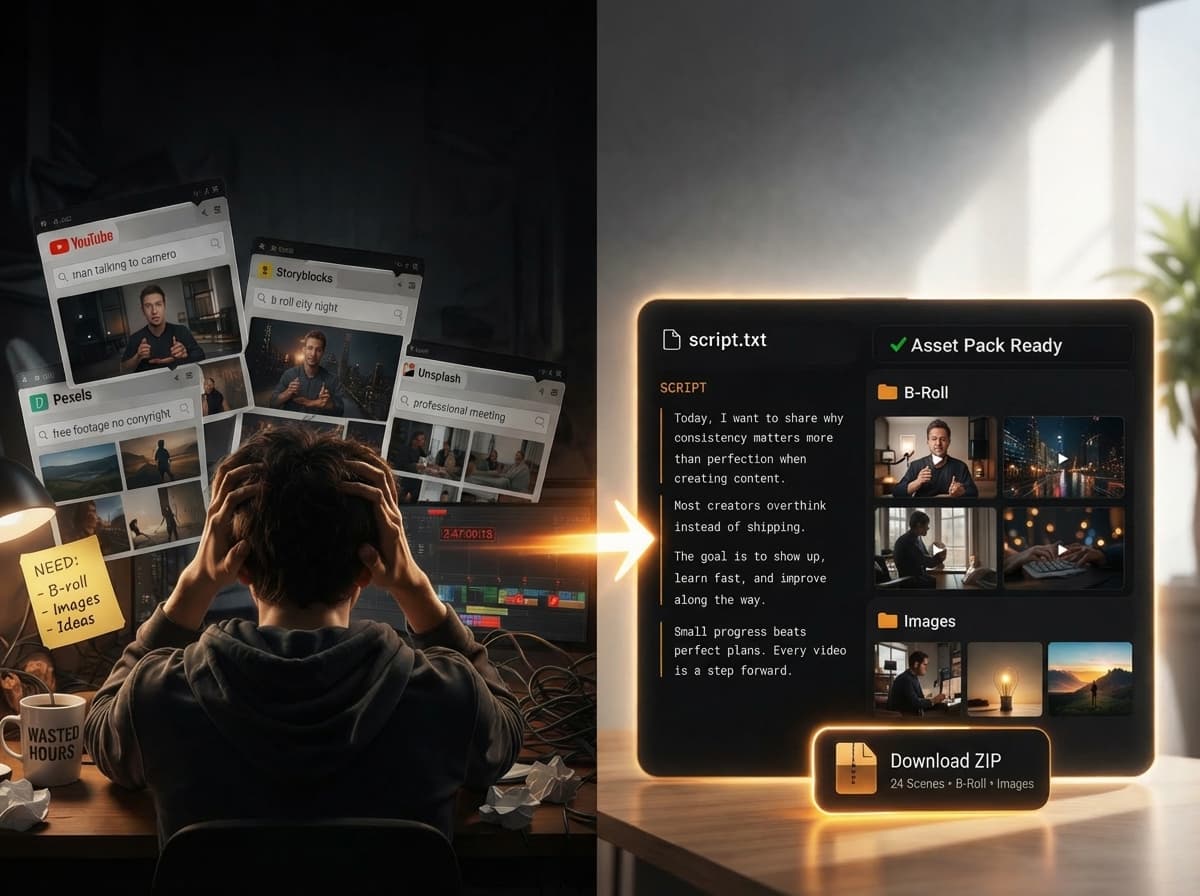
Automatically Find B-Roll From Your Script
Paste your video script. ScenePull detects visual scenes and automatically searches for matching stock clips and images, organized for your edit. Free previews cover the first 3 scenes with up to 2 media per scene.
Your Script → Your Shot List → Your B-Roll.
Paste your script
Drop your YouTube script, Reel narration, or any video text. ScenePull starts with the script you already have.
AI detects B-roll moments
ScenePull reads your script, identifies visual scenes, and generates search keywords for relevant stock footage and images.
Automatically find matching B-roll
Review matching stock clips and images organized by scene, then choose assets for your edit. Scene and media limits depend on your plan.
See your script become a B-roll pack.
AI Scene Detection
Reads your script and identifies distinct visual scenes, generating precise search keywords for each moment.
Automatic B-Roll Search
Searches for relevant stock footage and images using the visual moments detected in your script.
Stock Images
High-quality stills to complement your video. Ready for overlays, cutaways, and text backgrounds.
Organized Structure
Assets arrive in clean folders: /broll and /images with scene-prefixed filenames. No sorting needed.
Metadata Manifest
Every ZIP includes metadata.json mapping scenes to files. Batch import into any NLE in seconds.
Real-time Progress
Watch scene-by-scene as assets are found and downloaded. No black box, no waiting blind.
See it in action — no signup needed
Paste a script below and see how ScenePull breaks it into scenes with matching media previews.
Simple pricing.
Free lets you try the workflow. Starter is built for real video production, with more scenes, longer scripts, HD assets, and faster multi-source search.
Free
Try the workflow
- 3 generations / month
- Up to 3 scenes per script
- Scripts up to 2,000 characters
- SD quality b-roll
- Scene previews
Starter
For real video production
- 15 generations / month
- Up to 10 scenes per script
- Scripts up to 5,000 characters
- HD quality b-roll
- Full ZIP download
- Multi-source search
- Priority processing
Use code LAUNCH20 for 20% off
Pro
For studios & agencies
- 50 generations / month
- Up to 50 scenes per script
- Scripts up to 30,000 characters
- HD quality b-roll
- Full ZIP download
- Export to Premiere Pro, DaVinci, CapCut
- Deep search (5 results/keyword)
- Priority processing
Questions.
Yes. Paste your script and ScenePull detects visual scenes, generates search keywords, and searches for matching stock footage and images. Results are organized by scene for you to review before editing. Free previews cover up to the first 3 scenes with up to 2 media per scene. ScenePull sources existing stock media; it does not generate original AI footage or automatically edit a finished video.
ScenePull is a script-to-B-roll sourcing tool. It analyzes your video script, identifies visual scenes, and searches for matching stock footage and images, organized for your edit. Scene and media limits depend on your plan.
ScenePull works in three steps: (1) Paste your video script, (2) AI detects visual scenes and generates search keywords, (3) Review matching stock clips and images organized by scene. Free previews are limited; eligible paid plans support downloading an asset pack for your edit.
Yes. You can try the workflow free with no credit card required. Free previews cover up to the first 3 scenes with up to 2 media per scene. Check the current plan details for generation allowances. Paid plans offer more scenes and media, with download access depending on the plan.
ScenePull accepts any text-based script as input — YouTube scripts, Reel narrations, TikTok scripts, podcast outlines, or any video text. The output ZIP contains MP4 video clips and JPG/PNG images organized by scene.
ScenePull automates stock-media searches using visual moments detected in your script and organizes matching results by scene. You review the results and choose what fits your edit. Some scenes may still need manual sourcing when suitable stock media is unavailable.
ScenePull focuses on sourcing B-roll before you edit. You provide a script, and it searches for matching stock clips and images organized by scene. It does not automatically insert assets into a timeline or edit a finished video; you choose the assets and continue in your editor.
ScenePull is built for YouTube creators, TikTok and Reels creators, video editors, freelance videographers, and content agencies — anyone who needs b-roll and images to match a video script without spending hours on stock footage sites.
Yes. ScenePull uses AI for two things: (1) Scene detection — analyzing your script to identify distinct visual moments, and (2) Search optimization — generating precise keywords for each scene to find the most relevant stock footage and images.
Yes. All stock footage and images sourced by ScenePull come from free stock media libraries with licenses that allow commercial use. You can use the assets in YouTube videos, client projects, ads, and any commercial content.
A typical script with 4-6 scenes takes about 1-2 minutes to process. You can watch the progress in real-time as each scene is analyzed and assets are found. No waiting blind — you see every step.
Get started today
Stop Searching for
B-Roll Manually
ScenePull reads your script, identifies visual moments, and searches for matching stock clips and images automatically. Instead of opening multiple stock sites and searching scene by scene, start with results organized for your edit. Try the workflow free, with no credit card required.
Get started for free