
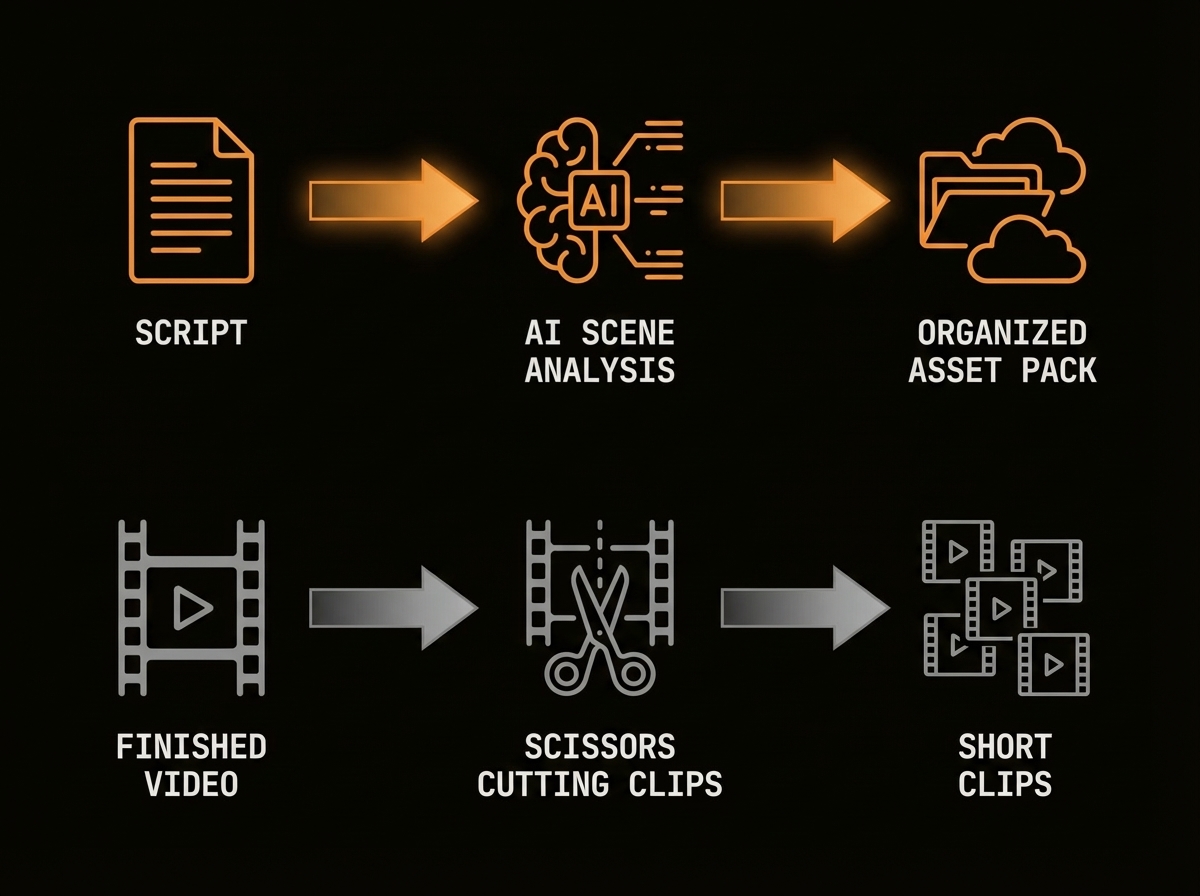
ScenePull vs OpusClip: They Solve Opposite Problems
ScenePull is a pre-production tool. OpusClip is a post-production tool. You paste a script into ScenePull before you record. You upload a finished video into OpusClip after you record. They don't compete — they work at completely different stages of the creator workflow.
That said, creators often search for one when they actually need the other. This page explains the difference clearly so you pick the right tool for your specific problem.
What Each Tool Actually Does
ScenePull takes your written script, analyzes it scene by scene, and generates matching b-roll visual assets for each segment. You then export those assets directly into Premiere Pro (XMEML), DaVinci Resolve (EDL), or CapCut (JSON) — your NLE gets a pre-built timeline with b-roll already mapped to your script. The whole process takes about 60 seconds per video.
ScenePull does not edit video. It does not generate video clips. It finds and organizes still and motion assets that match what you wrote, so you spend your editing time actually editing instead of hunting through stock libraries.
OpusClip takes a long-form video you've already finished — a YouTube video, a podcast recording, a webinar — and uses AI to identify the most engaging moments, then auto-generates vertical clips optimized for TikTok, Reels, and Shorts. It handles captions, cropping, and sometimes highlight scoring.
OpusClip does not touch your script. It does not help you plan a video. It works entirely from footage that already exists.
Where Each Tool Fits in Your Production Timeline
| Stage | What You Need | Tool |
|---|---|---|
| Write script | Nothing yet | — |
| Plan b-roll for each scene | B-roll asset generation | ScenePull |
| Record video | Nothing needed | — |
| Edit (add b-roll from timeline) | Your NLE | Premiere / DaVinci / CapCut |
| Repurpose long video into shorts | Clip extraction | OpusClip |
Most serious YouTube creators run both tools — ScenePull at the front of production, OpusClip at the back. They solve genuinely different problems.
The Real Cost of Confusing Them
If you think you need OpusClip but you're actually struggling with b-roll sourcing during editing: you'll spend $19-$39/mo on a tool that won't fix your problem. Your edits will still take 2 hours because you're still manually searching Pexels, Unsplash, and Shutterstock for footage that matches your voiceover.
If you think you need ScenePull but you're actually trying to repurpose a finished video into clips: ScenePull won't help. It needs a script as input. If you already have a finished video and want repurposed shorts, OpusClip handles that specific task — but ScenePull covers the far larger pre-production gap that no repurposing tool addresses.
Feature Comparison
| Feature | ScenePull | OpusClip |
|---|---|---|
| Input | Written script | Finished video |
| Output | B-roll assets + NLE timeline | Vertical short clips |
| Stage | Pre-production | Post-production |
| Works without footage | Yes | No |
| NLE export (Premiere, DaVinci, CapCut) | Yes | No |
| Auto-captions | No | Yes |
| Clip highlight scoring | No | Yes |
| Scene-by-scene b-roll matching | Yes | No |
| Free tier available | Yes (3 generations) | Yes (limited) |
| Paid plans start at | $9/mo | $19/mo |
When ScenePull Wins
→ Try ScenePull free — paste your first script
You're planning a new video. You have a script — or you're building one. You want to know what b-roll to use for each segment before you even open your NLE. You want your editing session to take 30 minutes instead of 2.5 hours.
ScenePull cuts b-roll research time by roughly 80% for most creators who make factual, educational, or explainer content. The time savings compound fast: if you publish 3 videos per week and each one costs you 90 minutes of b-roll hunting, that's 4.5 hours per week. ScenePull turns that into about 15 minutes.
What OpusClip Does Differently
You have a finished long-form video and you want to extract 3-5 viral clips from it without manual work. You don't want to touch a timeline. You want captions auto-generated and the aspect ratio handled automatically.
OpusClip handles this specific repurposing task. It's one of the stronger clip extraction tools in 2026, and if repurposing existing content is your goal, it earns its subscription.
The Workflow Where Both Make Sense
- Write script
- Run script through ScenePull — get b-roll assets mapped to your timeline (60 seconds)
- Record voiceover or talking-head footage
- Edit in Premiere/DaVinci/CapCut using the pre-built ScenePull timeline
- Export final video
- Upload to OpusClip — extract 3-5 short clips for TikTok/Reels/Shorts
If you're publishing consistently across long-form and short-form, running both tools adds maybe 5 minutes to your total production time and saves you hours.
Pricing Side by Side
| Plan | ScenePull | OpusClip |
|---|---|---|
| Free | 3 generations | Limited exports |
| Entry paid | $9/mo (15 gen) | ~$19/mo |
| Mid tier | $29/mo (50 gen + NLE export) | ~$39/mo |
ScenePull's $9 Starter plan covers about 15 video productions per month. For most creators publishing 2-4 videos per week, the $29 Pro plan with NLE export makes more sense since Premiere and DaVinci integration is where the real time savings happen.
Verdict
These tools cover different stages, but ScenePull is the higher-impact investment. Better b-roll in your source video means better clips when you repurpose. Start with ScenePull to fix the pre-production bottleneck — your videos will be stronger, your edits faster, and your short clips will have better source material. Add OpusClip later when you're ready to scale repurposing.
Try ScenePull Free
Paste your script, get production-ready b-roll in under 2 minutes. No credit card required.